1. Quick Start hugo
1.1 Create a site
Run these commands to create a Hugo site with the Ananke theme. The next section provides an explanation of each command.
hugo new site quickstart

cd quickstart

git init

git submodule add https://github.com/theNewDynamic/gohugo-theme-ananke.git themes/ananke

echo "theme = 'ananke'" >> hugo.toml

hugo server
View your site at the URL displayed in your terminal. Press Ctrl + C to stop Hugo’s development server.
1.2 Add content
hugo new content content/posts/my-first-post.md
Hugo created the file in the content/posts directory. Open the file with your editor.
1.3 Configure the site
With your editor, open the site configuration file (hugo.toml) in the root of your project.
baseURL = 'https://example.org/'
languageCode = 'en-us'
title = 'My New Hugo Site'
theme = 'ananke'
Make the following changes:
Set the
baseURLfor your production site. This value must begin with the protocol and end with a slash, as shown above.Set the
languageCodeto your language and region.Set the
titlefor your production site.
Start Hugo’s development server to see your changes, remembering to include draft content.
hugo server -D
2. Publish the site
hugo --gc --minify --baseURL "https://xxx.github.io/"
3. Github Page & Actions Host and Deploy
Step 1
Create a GitHub repository.
Step 2
Push your local repository to GitHub.
Step 3
Visit your GitHub repository. From the main menu choose Settings > Pages. In the center of your screen you will see this:

Step 4
Change the Source to GitHub Actions. The change is immediate; you do not have to press a Save button.

Step 5
Create an empty file in your local repository.
.github/workflows/hugo.yaml
Step 6
Copy and paste the YAML below into the file you created. Change the branch name and Hugo version as needed.
cd quickstart
mkdir -p .github/workflows
touch .github/workflows/hugo.yaml
vim .github/workflows/hugo.yaml
Copy the below text and paste the content into the file .github/workflows/hugo.yaml
# Sample workflow for building and deploying a Hugo site to GitHub Pages
name: Deploy Hugo site to Pages

on:
  # Runs on pushes targeting the default branch
  push:
    branches:
      - master

  # Allows you to run this workflow manually from the Actions tab
  workflow_dispatch:

# Sets permissions of the GITHUB_TOKEN to allow deployment to GitHub Pages
permissions:
  contents: read
  pages: write
  id-token: write

# Allow only one concurrent deployment, skipping runs queued between the run in-progress and latest queued.
# However, do NOT cancel in-progress runs as we want to allow these production deployments to complete.
concurrency:
  group: "pages"
  cancel-in-progress: false

# Default to bash
defaults:
  run:
    shell: bash

jobs:
  # Build job
  build:
    runs-on: ubuntu-latest
    env:
      HUGO_VERSION: 0.128.0
    steps:
      - name: Install Hugo CLI
        run: |
          wget -O ${{ runner.temp }}/hugo.deb https://github.com/gohugoio/hugo/releases/download/v${HUGO_VERSION}/hugo_extended_${HUGO_VERSION}_linux-amd64.deb \
          && sudo dpkg -i ${{ runner.temp }}/hugo.deb
      - name: Install Dart Sass
        run: sudo snap install dart-sass
      - name: Checkout
        uses: actions/checkout@v4
        with:
          submodules: recursive
          fetch-depth: 0
      - name: Setup Pages
        id: pages
        uses: actions/configure-pages@v5
      - name: Install Node.js dependencies
        run: "[[ -f package-lock.json || -f npm-shrinkwrap.json ]] && npm ci || true"
      - name: Build with Hugo
        env:
          HUGO_CACHEDIR: ${{ runner.temp }}/hugo_cache
          HUGO_ENVIRONMENT: production
          TZ: America/Los_Angeles
        run: |
          hugo \
            --gc \
            --minify \
            --baseURL "${{ steps.pages.outputs.base_url }}/"
      - name: Upload artifact
        uses: actions/upload-pages-artifact@v3
        with:
          path: ./public

  # Deployment job
  deploy:
    environment:
      name: github-pages
      url: ${{ steps.deployment.outputs.page_url }}
    runs-on: ubuntu-latest
    needs: build
    steps:
      - name: Deploy to GitHub Pages
        id: deployment
        uses: actions/deploy-pages@v4
Step 7
Commit the change to your local repository with a commit message of something like “Add workflow”, and push to GitHub.
cd quickstart
git init
git add .
git commit -m "Initial commit"echo "public/" >> ./gitignore
git remote add origin https://github.com/<xxx>/<xxx>.github.io.git
git push -u origin master
git add .gitignore
git add .github/workflows/hugo.yaml
git commit -m "Ignore Public & Add workflow"
git push origin main
Remember to replace to your github username.
Step 8
From GitHub’s git repo’s setting menu, choose **Settings — Pages **. You will see something like this:

Select the source with Github Actions, it will take effect immediately.
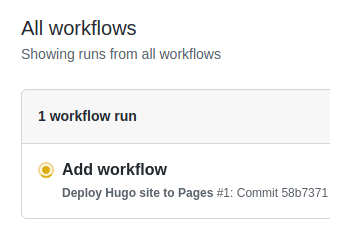
Then, next from GitHub’s main menu, choose Actions. You will see something like this:
Step 9
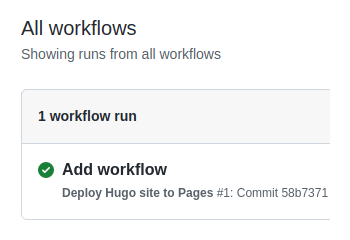
When GitHub has finished building and deploying your site, the color of the status indicator will change to green.
Step 10
Click on the commit message as shown above. You will see this:
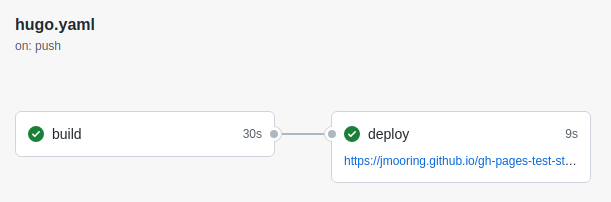
Under the deploy step, you will see a link to your live site.
In the future, whenever you push a change from your local repository, GitHub will rebuild your site and deploy the changes.
 Hugo
Hugo